
Legal Time Tracking Software That Connects Work to the Bill.
LeanLaw is legal time tracking software for law firms that use QuickBooks Online. Attorneys can record billable work with a timer or manual entry, assign it to a client and matter, and send it into the billing workflow. Time and expenses stay connected to invoice review and the firm's books. QuickBooks Online requires a separate subscription.
1,000+
law firms run on LeanLaw
70%
faster invoice collections
$61K
leaked revenue recovered per attorney each year
20–50×
ROI for a typical 10-attorney firm
What software should a small law firm use to track billable hours?
Small law firms need legal time tracking that captures work by client and matter and moves it straight into billing. LeanLaw gives solos and small teams one-tap mobile timers, manual and retrospective entry, and direct QuickBooks Online sync, so every billable hour reaches the invoice without extra administration. LeanLaw pairs with the practice-management and document tools your firm already uses.
See the billing software comparison, review pricing, or test your workflow in a demo.
| Approach | Matter and billing context | Accounting handoff | Best fit |
|---|---|---|---|
| LeanLaw | One-tap mobile timers, manual and retrospective entry, and matter-level billing | Direct QuickBooks Online sync | Firms pairing LeanLaw with their practice and document tools |
| Spreadsheets | Set up and checked manually | Manual transfer to invoices and books | Simple workflows with staff review |
| Generic time tracker | Varies; verify legal billing fields | May require export or separate integration | Firms with a separate legal billing process |
| Practice-management suite | Usually part of broader matter workflows; verify details | Varies by product and plan | Firms also seeking case, document, and intake tools |
What time tracking software for law firms should cover
Beyond a timer, law firm time tracking software should keep entries billable, capture costs with the matter, and move reviewed work into invoices and the books.
| Need | LeanLaw workflow |
|---|---|
| Capture time as work happens | Desktop and mobile timers, plus manual time entry |
| Keep entries billable | Assign a client, matter, timekeeper, rate, and narrative |
| Record costs | Add matter-level expenses alongside time entries |
| Review before billing | Send entries into the invoice review and approval workflow |
| Keep accounting connected | Use QuickBooks Online as the general ledger for the billing workflow |
Up to 40% of Billable Time Disappears Before It Reaches an Invoice.
Attorneys reconstruct time at the end of the day — or the week — from calendar entries, emails, and memory. Every gap between the work and the entry is revenue that never gets billed. The longer that gap, the more that vanishes.
LeanLaw eliminates the gap entirely. One-tap timers start the moment the work starts — on desktop, on mobile, even in the courtroom. Every entry lands directly in the billing queue, assigned to the right matter, ready to invoice.
- Start and stop timers from any device in one tap
- Multiple simultaneous timers for multi-matter days
- Enter time manually or by voice — whichever is fastest
- Time entries route to billing queue automatically
- WIP reports show every unbilled minute by attorney and matter
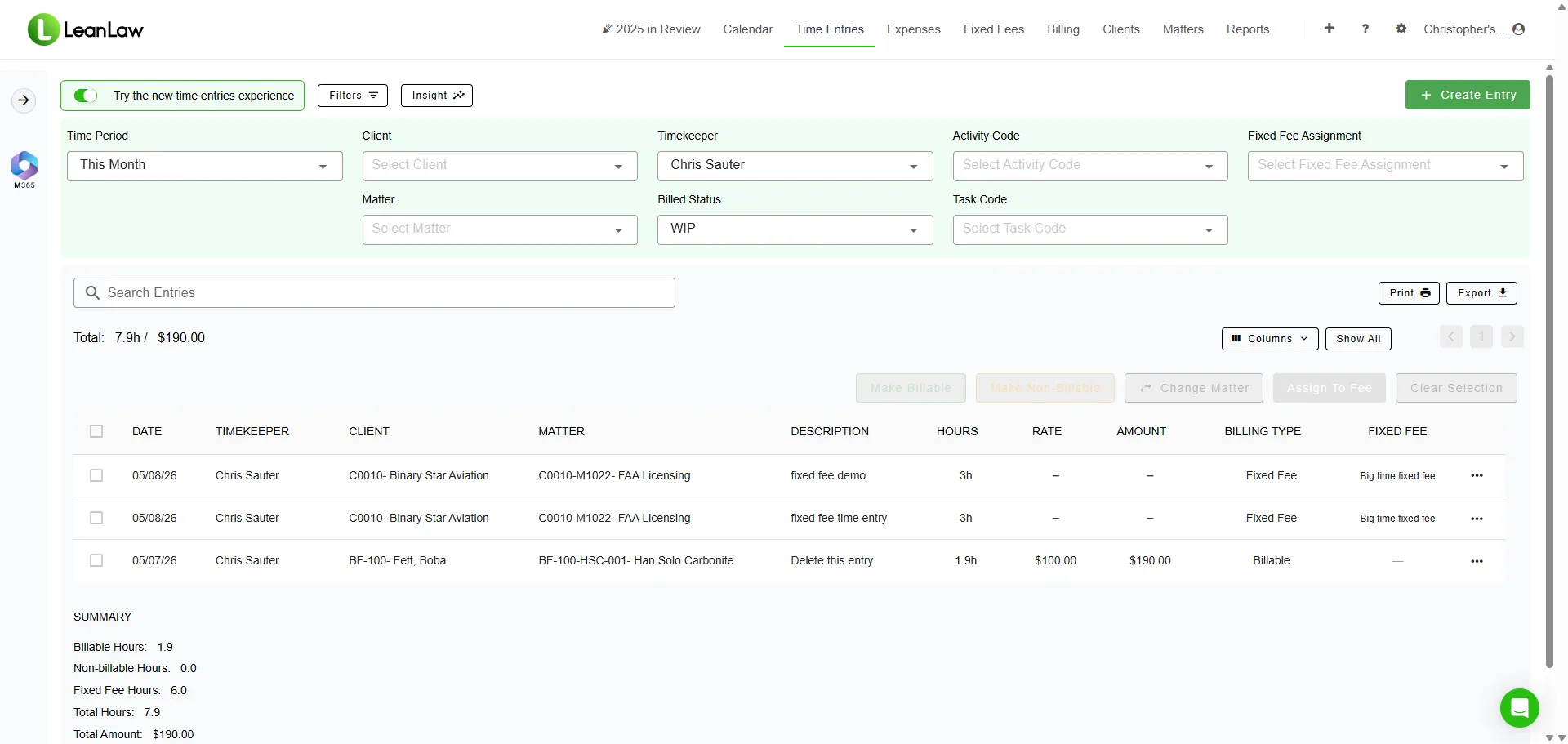
Multiple simultaneous timers — switch matters without losing a second
Every Way Attorneys Work. Every Minute Captured.
No two attorneys bill the same way. LeanLaw supports every time-entry method — live timers, retrospective entry, voice notes, and bulk edits — so every attorney captures time the way that works best for them.
Start Billing the Moment Work Starts
A single tap starts a timer on any device. Time is tracked in seconds and syncs automatically to the cloud — so the number on your billing queue is always exact, not rounded. Pause, switch matters, or run multiple timers simultaneously.
Track Time From Anywhere
Full-featured time tracking on every smartphone and tablet. Log time in the courtroom, on client calls, between meetings, or from the car — no excuse for a missed entry.
Manual and Retrospective Entry
Prefer entering time at the end of the day? Type it in manually with duration, narrative, matter, and billing code. Bulk-edit multiple entries at once for attorneys who batch their time.
Custom Rates Per Attorney and Matter
Set default billing rates by attorney and override them per matter. Flat-fee work? Track time against the budget without it appearing on the invoice. Every rate scenario is supported.
See Every Unbilled Minute in Real Time
Work-in-progress reports show everything that has been worked but not yet invoiced — by attorney, by matter, by practice area. Nothing hides in a spreadsheet.
Rich Entries That Clients Respect
Add activity codes, task codes, and billing narratives to every entry. UTBMS and LEDES codes for e-billing clients are supported out of the box — no manual coding after the fact.
Surface Missed Hours From Your Calendar
LeanLaw connects to your calendar — including Microsoft Office 365 — so you can review calendar events and convert meetings, calls, and hearings into billable time entries. Nothing that happened gets left behind.
Legal Time Tracking Software Built for Law Firms
LeanLaw is legal time tracking software purpose-built for law firms — one-tap timers, matter-level time capture, and mobile entry that syncs directly to QuickBooks Online. Unlike general-purpose time trackers, every entry in LeanLaw carries the billing context law firms need: timekeeper, client, matter, billing code, and rate — ready for the billing queue the moment the timer stops.
As law firm time tracking software, LeanLaw replaces the spreadsheets, sticky notes, and end-of-week memory reconstruction that cause up to 40% of billable time to leak before it ever reaches an invoice. Firms that switch to LeanLaw recover an average of $61,000 in leaked revenue per attorney each year — because time is captured the moment it happens, not guessed at later.
- Purpose-built for law firm billing, not generic project time
- Matter- and client-level time tracking out of the box
- One-tap timers on desktop and mobile
- Live sync to QuickBooks Online — no export, no re-entry
Follow the complete workflow from time entry to invoice review and delivery, see how client funds stay separate in trust accounting, verify the QuickBooks Online connection, and compare plans before choosing a setup.
What is the best legal time tracking software for a law firm?
The best legal time tracking software for a law firm captures time at the matter level, works on mobile, and syncs directly to your accounting system without manual export. LeanLaw is legal time tracking software built specifically for law firms on QuickBooks Online — one-tap timers, automatic billing-queue routing, and real-time sync recover an average of $61,000 in leaked revenue per attorney each year.
What software should a small law firm use to track billable hours?
Small law firms should use law firm time tracking software designed for legal billing rather than generic project-time tools, since legal billing requires matter assignment, timekeeper rates, and trust-accounting-aware invoicing. LeanLaw gives small firms one-tap mobile timers, manual and retrospective entry, and direct QuickBooks Online sync — so a solo or small-team firm can capture every billable hour without adding administrative overhead.
Is legal time tracking software different from regular time tracking apps?
Yes. Legal time tracking software adds law-firm-specific fields — matter, client, billing code, UTBMS/LEDES codes, and billing rate by attorney — that general time trackers don't support. LeanLaw's law firm time tracking software routes every entry straight into the billing queue and QuickBooks Online, so time capture and invoicing share one connected system instead of requiring a manual handoff between tools.
"We've used LeanLaw for a year and a half and we're able to invoice our clients within two to three days, versus 10 or 12 — quickly and electronically, and they pay us faster, which increases our cash flow."
Alicia Wood, Firm Administrator
Burkhalter Law
Every Client Cost Captured, Billed, and Recovered.
Filing fees, court costs, expert witnesses, travel, copies, postage — client expenses that go untracked are money left on the table. LeanLaw makes it as easy to log an expense as it is to log time, so every recoverable cost makes it onto the invoice.
- Log expenses from desktop or mobile in seconds
- Attach receipts and notes directly to the matter record
- Expenses flow into the billing queue automatically
- Apply flat-rate expense codes or pass through actual costs
- Expense totals appear on client invoices with full detail
- Every expense syncs to QuickBooks Online in real time
Expenses added to billing queue instantly — ready to invoice
From First Timer Tap to Collected Payment —
In One Connected System.
Most firms lose revenue between the steps. Time that never becomes an invoice. Invoices that sit unpaid for weeks. LeanLaw connects every step so nothing falls through the cracks.
Capture Time & Expenses
One-tap timers and mobile expense logging capture every billable moment at the moment it happens — on any device.
Review & Approve WIP
Billing admins review work-in-progress by attorney and matter. Edit narratives, adjust write-ups, and approve entries for invoicing in one view.
Generate & Send Invoices
Batch-invoice all approved time and expenses in a single click. Polished, branded invoices go to clients within 2-3 days instead of 10-12.
Collect & Reconcile
Clients pay online via LeanLaw Pay. Every payment posts to QuickBooks Online automatically — AR updated, matter closed, cash in the bank.
$61K
in leaked revenue recovered per attorney per year
2-3 days
average invoice turnaround vs. 10-12 days before LeanLaw
70%
faster invoice collections vs. industry average
The Courtroom. The Coffee Shop. The Car. No Excuses for a Missed Entry.
LeanLaw is designed for how attorneys actually work — which is rarely sitting at a desk. The mobile experience is a full-featured time and expense tracker, not a watered-down mobile companion. Everything that matters for capturing billable time is front and center.
One-tap timer start
Tap once to start billing. The timer runs in the background while you work.
Offline capability
Log time without a signal. Entries sync automatically when connectivity returns.
Expense with receipt
Photograph receipts, enter amounts, and assign to matters — all from the same screen.
Matter search
Find any active matter in seconds. Client name, matter number, or keyword search.
Your Calendar Already Knows What You Billed. LeanLaw Helps You Capture It.
Every meeting, call, hearing, and appointment that lands on your calendar is a potential billable event. LeanLaw connects to your calendar — including Microsoft Office 365 — and surfaces those events so attorneys can review them and convert any missed time directly into billable entries. No more reconstructing the week from memory.
This calendar view closes the gap between what attorneys actually did and what gets billed. Paired with one-tap timers and automatic cloud sync — where time is tracked in seconds, not rounded increments — it is the most complete picture of recoverable time available in legal billing software today — timers to the second, calendar capture, and mobile, in one system.
- Connects to Microsoft Office 365 and Google calendars
- Calendar view surfaces unlogged meetings and appointments
- One click converts a calendar event into a time entry
- Time tracked in seconds with automatic cloud sync
- Pairs with Billables AI, which drafts time entries from your calendar and email activity for one-click approval.
Calendar events from Office 365 or Google surfaced for one-click billing
"The revenue allocation feature alone saves us 5+ hours every month. No more spreadsheets to figure out who gets paid what on flat-fee matters."
Jennifer Wells
Beard St. Clair Gaffney Law
WIP This Month
Hours Billed
Realization Rate
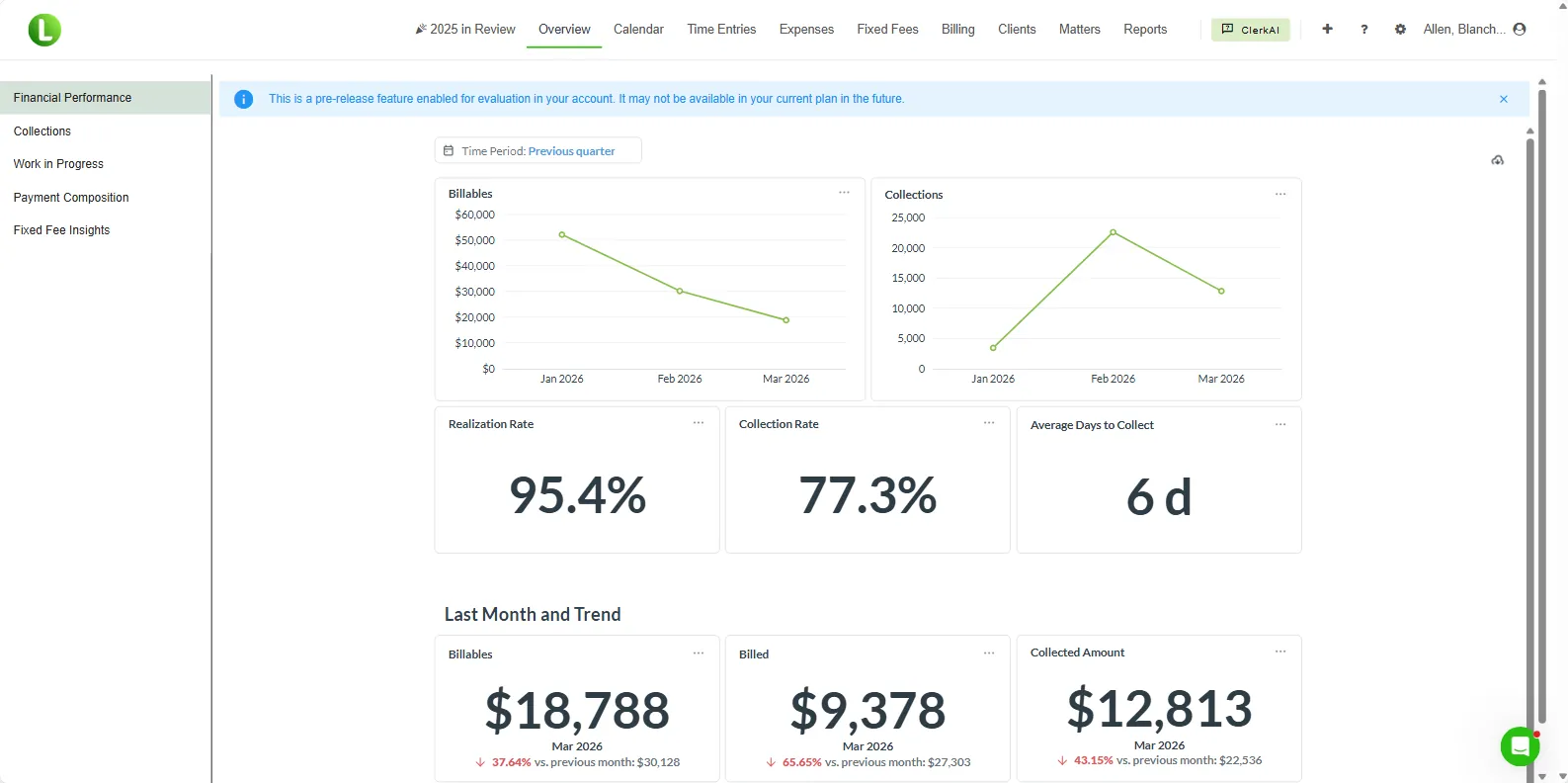
Attorney productivity and realization rates — updated in real time
Know Which Attorneys Are Billing — and Which Aren't.
LeanLaw turns time and expense data into management intelligence. See attorney productivity, realization rates, WIP aging, and effective hourly rates in real time — so you can coach, reward, and act before the billing cycle closes.
- WIP dashboard by attorney, matter, and practice area
- Realization rate and effective hourly rate per attorney
- Billable vs. non-billable hours breakdown
- Time entry compliance — who has not submitted this week
- Expense recovery rate by matter type
- All reports sync live from QuickBooks Online data
Time Entries That Flow Straight Into Your Books.
Most legal billing tools require a manual export to get time data into QuickBooks. LeanLaw is built natively on QuickBooks Online. Every invoiced time entry and expense posts to your general ledger automatically — no exports, no reconciliation, no lag.
LeanLaw is not a practice management system. It is a legal revenue operations platform — purpose-built to handle the financial side of law: time capture, billing, trust accounting, and collections. That focus is why 1,000+ firms pair it with QuickBooks Online instead of an all-in-one tool that tries to do everything adequately but nothing exceptionally.
- Every invoice syncs to QuickBooks Online AR in real time
- Matter codes map to QuickBooks classes and customers automatically
- Expense entries post to the correct chart of accounts
- Trust payments and retainer applications reconcile instantly
- Your bookkeeper sees everything in QuickBooks — no second system
#1-rated legal app in the QuickBooks Online App Store
"Tracking payments to specific matters was a nightmare before LeanLaw. Now everything syncs to QuickBooks automatically. We see invoices paid 70% faster."
Amanda Coughlan, Billing Coordinator
Zahn Law Group
1,000+
law firms run on LeanLaw
70%
faster invoice collections
$61K
leaked revenue recovered per attorney each year
20–50×
ROI for a typical 10-attorney firm
LeanLaw Time & Expense Tracking — Common Questions
How does LeanLaw time tracking work?
LeanLaw provides one-tap timers on desktop and mobile. Attorneys can start a timer from any device, add a narrative, assign the time to a matter, and submit — all in under 30 seconds. Time entries sync to the billing queue instantly and post to QuickBooks Online automatically when invoiced.
How much billable time do law firms lose without proper time tracking?
Studies show law firms lose up to 40% of billable time through leakage — time worked but never recorded. LeanLaw firms recover an average of $61,000 in leaked revenue per attorney each year by capturing every billable minute at the moment it happens.
Can attorneys track time on mobile devices?
Yes. LeanLaw's mobile-ready interface lets attorneys start timers, log expenses, and submit time entries from any smartphone or tablet — so billable time gets captured in court, on calls, and between meetings, not reconstructed from memory at the end of the week.
How does LeanLaw handle expense tracking for law firms?
LeanLaw lets attorneys and staff log client expenses directly to matters — court costs, filing fees, travel, expert witnesses, and any other disbursement. Expenses flow into the billing queue and appear on client invoices automatically. Every expense syncs to QuickBooks Online in real time.
Does LeanLaw integrate time tracking with billing?
Yes. Time and expense entries in LeanLaw feed directly into the billing queue. Billing administrators can review WIP, approve entries, and generate invoices in batch — all without re-entering data. The entire workflow from first timer tap to collected payment lives in one connected system.
Can LeanLaw track time for flat-fee and contingency matters?
Yes. LeanLaw supports all billing models. For flat-fee matters, time is tracked against the matter budget so you can see your true margin — even if the time never appears on the invoice. For contingency cases, time and expense tracking feeds cost-recovery and settlement worksheets.
What reports does LeanLaw provide for time and expense data?
LeanLaw generates WIP reports by attorney, matter, and practice area; realization rate and effective hourly rate reports; billable vs. non-billable hour breakdowns; time-entry compliance reports; and expense recovery summaries — all updated in real time from QuickBooks Online.
Does LeanLaw have a document management system?
No. LeanLaw is an accounting-focused legal billing platform, not a document management system. It is designed to handle the financial operations of a law firm — time tracking, billing, trust accounting, and collections — with deep QuickBooks Online integration. For document management, LeanLaw integrates with best-in-class DMS providers such as NetDocuments, so firms can pair purpose-built tools rather than compromising on either.
Does LeanLaw integrate with Microsoft Office 365 calendars?
Yes. LeanLaw connects to Microsoft Office 365 calendars (as well as Google Calendar) so attorneys can review their calendar events and convert meetings, calls, and hearings into billable time entries directly from a calendar view. This closes the gap between time worked and time captured without requiring attorneys to reconstruct their day from memory.
Does LeanLaw work with Billables.ai?
Yes. LeanLaw integrates with Billables.ai for AI-assisted time capture across email, calendar, documents, and other work, so more billable time reaches the billing queue.