
From First Timer Tap to Cash in the Bank.
Most law firms lose revenue between the steps — time that never becomes an invoice, invoices that sit for weeks, payments that chase themselves. LeanLaw’s smart billing workflow connects every step in one system so nothing falls through the cracks.
1,000+
law firms run on LeanLaw
70%
faster invoice collections
$61K
leaked revenue recovered per attorney each year
20–50×
ROI for a typical 10-attorney firm
Revenue Is Slipping Through Every Gap in Your Billing Process.
Attorneys capture time in one place, billing staff invoice from another, QuickBooks gets updated manually at month-end, and collections is a separate chore entirely. Each handoff is a place where revenue disappears — as unbilled time, delayed invoices, or aging receivables that never get collected.
The typical law firm loses up to 30–40% of its earned revenue before a dollar ever reaches the bank. LeanLaw closes every gap by connecting the entire billing cycle in one system.
- Time entered in one system, invoiced from another — data entry twice
- Invoice day takes 8+ hours because nothing is connected
- QuickBooks updated manually at month-end — books always stale
- Collections handled ad-hoc — no dashboard, no reminders, no system
- Partners flying blind on WIP, realization rates, and cash flow
12 hrs
An attorney works a full day
Time worked and captured in some form
6–8 hrs
Makes it onto an invoice
Lost to billing delays, write-downs, and disconnected systems
6–7 hrs
Actually collected
Lost to slow payments, write-offs, and no follow-up system
One Connected Workflow. Every Step Automated.
LeanLaw connects the five stages of your billing cycle so that revenue doesn’t leak at any handoff. Here’s how work turns into cash in a firm running on LeanLaw.
Time & Expenses Captured at the Moment They Happen
Attorneys start one-tap timers on desktop or mobile the moment work begins. Expenses are logged directly to the matter. Every entry goes straight to the billing queue — no end-of-day reconstruction, no missed minutes.
- One-tap timers on desktop and mobile
- Multiple simultaneous timers for multi-matter days
- Expense logging with receipts from any device
- Every entry routes to billing queue automatically
- WIP visible in real time by attorney and matter
Billing Staff Review & Approve WIP in One Queue
All time and expenses land in a single billing queue. Billing administrators review work-in-progress by attorney or matter, edit narratives, adjust write-ups or write-downs, and approve entries — without touching a spreadsheet or a second system.
- Single billing queue — all WIP in one view
- Filter by attorney, matter, or practice area
- Edit narratives and adjust billing rates inline
- Write-up and write-down adjustments before approval
- Approval workflow routes entries to invoicing
Batch-Generate and Send Polished Invoices in Minutes
Approved time and expenses convert to client invoices in one click — individually or in batch across all open matters. Branded invoices go out electronically within 2–3 days of month-end instead of the 10–12 days it takes firms on disconnected systems.
- Batch-invoice all approved WIP in a single click
- Branded, client-ready invoice format
- Prior balance and retainer applied automatically
- Electronic delivery — email or client portal
- UTBMS and LEDES codes for e-billing clients
Every Invoice Posts to QuickBooks Online Automatically
LeanLaw is built natively on QuickBooks Online — not bolted on via export. The moment an invoice is generated, it appears in your QuickBooks AR ledger. Your bookkeeper sees a clean, current set of books without lifting a finger.
- Invoices post to QuickBooks AR in real time
- Matter codes map to QuickBooks classes automatically
- Trust payments and retainer applications reconcile instantly
- No exports, no imports, no manual reconciliation
- #1-rated legal app in the QuickBooks Online App Store
Clients Pay Online — Collections Run Themselves
Every invoice includes an embedded payment link. Clients pay by card or ACH — no phone calls, no checks in the mail. Automated reminders go out on unpaid invoices. A real-time AR dashboard tracks aging at 30, 60, and 90+ days so nothing goes unnoticed.
- Payment links embedded in every invoice
- Credit card and ACH accepted
- Automated payment reminders on unpaid invoices
- Real-time AR dashboard — 30 / 60 / 90+ day aging
- 70% faster invoice collections vs. prior workflow
“We've used LeanLaw for a year and a half and we're able to invoice our clients within two to three days, versus 10 or 12 — quickly and electronically, and they pay us faster, which increases our cash flow.”
Alicia Wood, Firm Administrator
Burkhalter Law
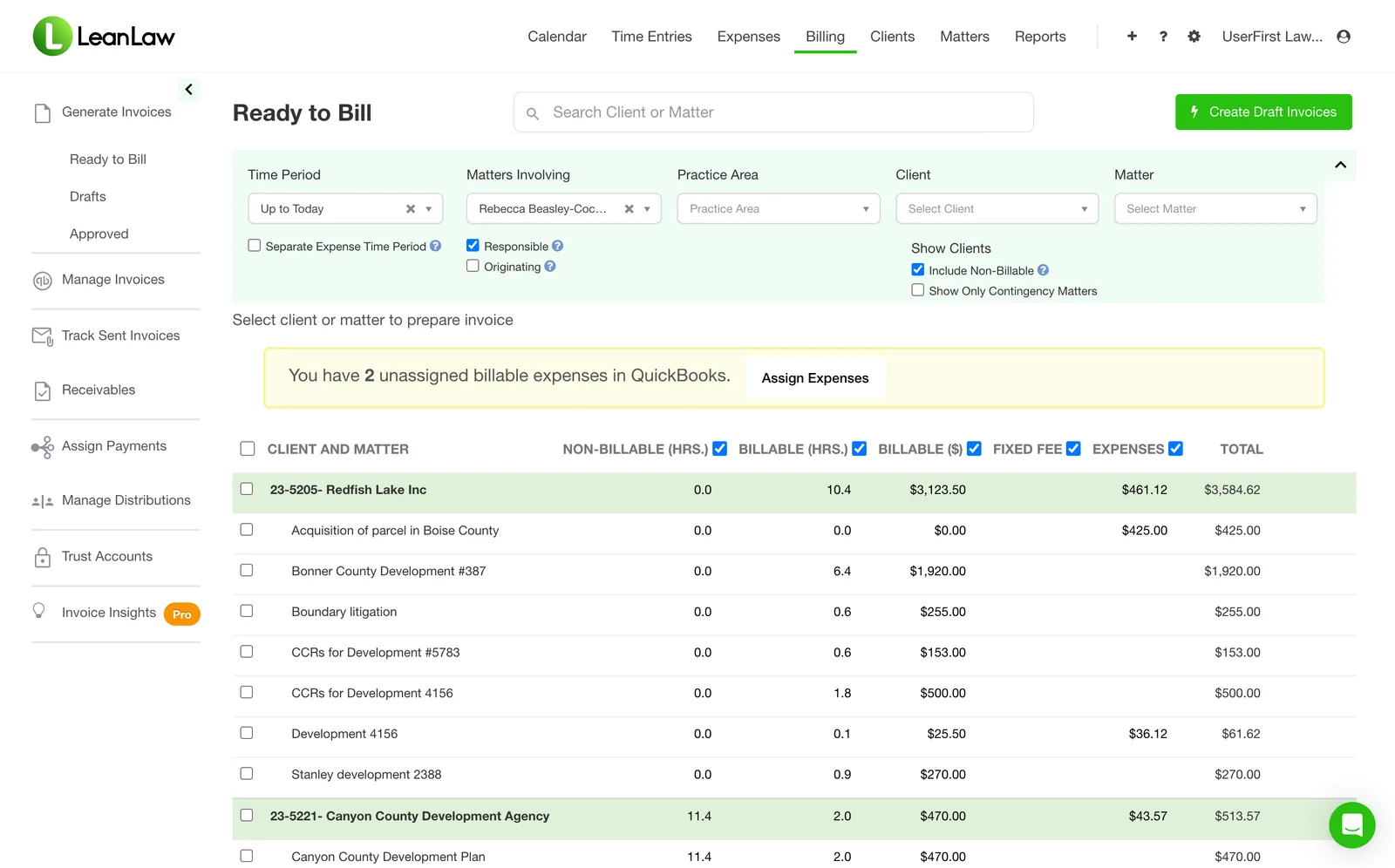
Review, edit, and approve all WIP before invoicing — one view, one action
Invoice Day Used to Take 8 Hours. Now It’s 2.
The billing queue is where your billing administrator runs the firm’s billing cycle. Every time entry and expense from every attorney is collected in one place — filterable by matter, attorney, practice area, or billing status. Review narratives, make adjustments, and approve for invoicing without switching screens.
- All WIP centralized — no per-attorney spreadsheets
- Edit narratives and billing codes inline before approval
- Write-ups and write-downs with reason codes for reporting
- Approve individual entries or approve all with one click
- Batch-generate all approved invoices simultaneously
- Partner review workflow for high-value matters
“Tracking payments to specific matters was a nightmare before LeanLaw. Now everything syncs to QuickBooks automatically. We see invoices paid 70% faster.”
Amanda Coughlan, Billing Coordinator
Zahn Law Group
Your Books Stay Current — Without Anyone Touching Them.
LeanLaw is not just integrated with QuickBooks Online — it is built on it. When a client pays an invoice, that payment posts to the correct matter, client ledger, and chart of accounts the moment the payment clears. Your bookkeeper sees a clean, current set of books without a single manual entry.
- Invoices post to QuickBooks AR the moment they are generated
- Payments sync in real time — no batch reconciliation
- Matter codes map to QuickBooks classes and customers automatically
- Trust deposits and retainer applications reconcile instantly
- Operating and trust accounts stay separated — always compliant
- Full audit trail per matter, per client, per attorney
#1-rated legal app in the QuickBooks Online App Store
Measurable Outcomes at Every Stage of the Billing Cycle
Firms that move to LeanLaw see the impact across the entire workflow — from faster time entry to accelerated collections — often within the first billing cycle.
$61K
in leaked revenue recovered per attorney per year
Time that was worked but never billed, now captured
2-3 days
to invoice after month-end
Down from 10-12 days on disconnected systems
70%
faster invoice collections
Embedded payment links eliminate the collections gap
5+ hrs
saved per month on revenue allocation alone
No more spreadsheets to figure out who gets paid what
20-50x
ROI for a typical 10-attorney firm
Recovering $61K per attorney, at a fraction of the software cost
1,000+
law firms running on LeanLaw today
From 2-attorney solo shops to 100+ attorney firms
“The revenue allocation feature alone saves us 5+ hours every month. No more spreadsheets to figure out who gets paid what on flat-fee matters.”
Hourly, Flat-Fee, Contingency — All in One Workflow
LeanLaw’s billing workflow adapts to every fee arrangement your firm uses. Flat-fee matters track time against budget without it appearing on the invoice. Contingency cases log costs for settlement worksheets. Mixed matters bill some work hourly and some flat. Every billing model flows through the same queue, the same approval process, and the same QuickBooks sync.
What a Connected Billing Workflow Actually Looks Like
Disconnected Systems
- Attorneys track time in a spreadsheet or post-it notes
- Billing admin re-enters everything into a billing system
- Invoices exported and manually loaded into QuickBooks
- Partners wait 6 weeks for financial reports
- Collections follow-up done by phone and sticky notes
- AR aging unknown until the monthly bookkeeper visit
- Invoice day is an 8-hour ordeal every month
- Revenue leaks at every handoff between systems
LeanLaw Smart Billing Workflow
- Attorneys tap once to start a timer on any device
- Time flows to the billing queue automatically — zero re-entry
- Invoices post to QuickBooks AR the moment they are generated
- Partners see real-time WIP, billed, and collected dashboards
- Payment reminders go out automatically on a schedule
- AR aging dashboard updated in real time — always current
- Invoice day takes 2 hours instead of 8
- Revenue recovered at every step — $61K per attorney per year
Smart Billing Workflow — Common Questions
How does LeanLaw's billing workflow work?
LeanLaw connects every step of the billing cycle in one system: attorneys capture time and expenses as they work, billing staff review and approve WIP in a single queue, invoices are generated in batch and sent electronically, QuickBooks Online updates automatically, and clients pay online with a payment link embedded in every invoice.
How fast can law firms invoice with LeanLaw?
LeanLaw firms invoice clients within 2-3 days of month-end versus the industry norm of 10-12 days, because every step from time entry to invoice generation is connected in one workflow. Firms using LeanLaw also collect invoices 70% faster thanks to embedded payment links and automated follow-up.
Does LeanLaw sync with QuickBooks Online automatically?
Yes. LeanLaw is the #1-rated legal app in the QuickBooks Online App Store. Every invoice, payment, trust deposit, and expense posts to QuickBooks Online in real time — no manual exports, no reconciliation work, no data entry.
Can billing admins review and approve time entries before invoicing?
Yes. LeanLaw's billing queue gives administrators a single view of all work-in-progress by attorney and matter. Admins can edit narratives, adjust write-ups or write-downs, and approve entries for invoicing — then batch-generate all approved invoices in one click.
What billing models does LeanLaw support?
LeanLaw supports hourly billing, flat-fee billing, contingency matters, and mixed billing. Time is always tracked against matters so partners can see effective hourly rates regardless of the fee arrangement. UTBMS and LEDES codes are supported for e-billing clients.
How does LeanLaw handle collections after invoices are sent?
Every LeanLaw invoice includes an embedded payment link. Clients pay by credit card or ACH directly from the invoice. Automated payment reminders go out on a schedule for unpaid invoices. A real-time AR aging dashboard shows all outstanding balances at 30, 60, and 90+ days — so collections becomes a system, not a chore.
How long does it take to get started with LeanLaw?
Most firms are live within one week. The onboarding process starts with a one-click QuickBooks Online connection, followed by matter import and a one-hour live training session with a LeanLaw specialist. The first invoice typically goes out in the same week as setup.