
Compensation Reports for Law Firms
Fully automated and flexible compensation tracking: by originator, responsible, and working — cutting out the 5+ hours a month firms lose to manual spreadsheets, so comp conversations start from data, not a spreadsheet fight.
Welcome to an interactive tutorial of LeanLaw's compensation report capabilities for law firms. See invoices paid 70% faster with accounting workflows from onboarding to collections.
- Track compensation by originator, responsible attorney, and working attorney
- Automate origination credit calculations — no more spreadsheets
- See partner draws and equity distributions in real time
- Tie every dollar billed and collected back to the attorney who earned it
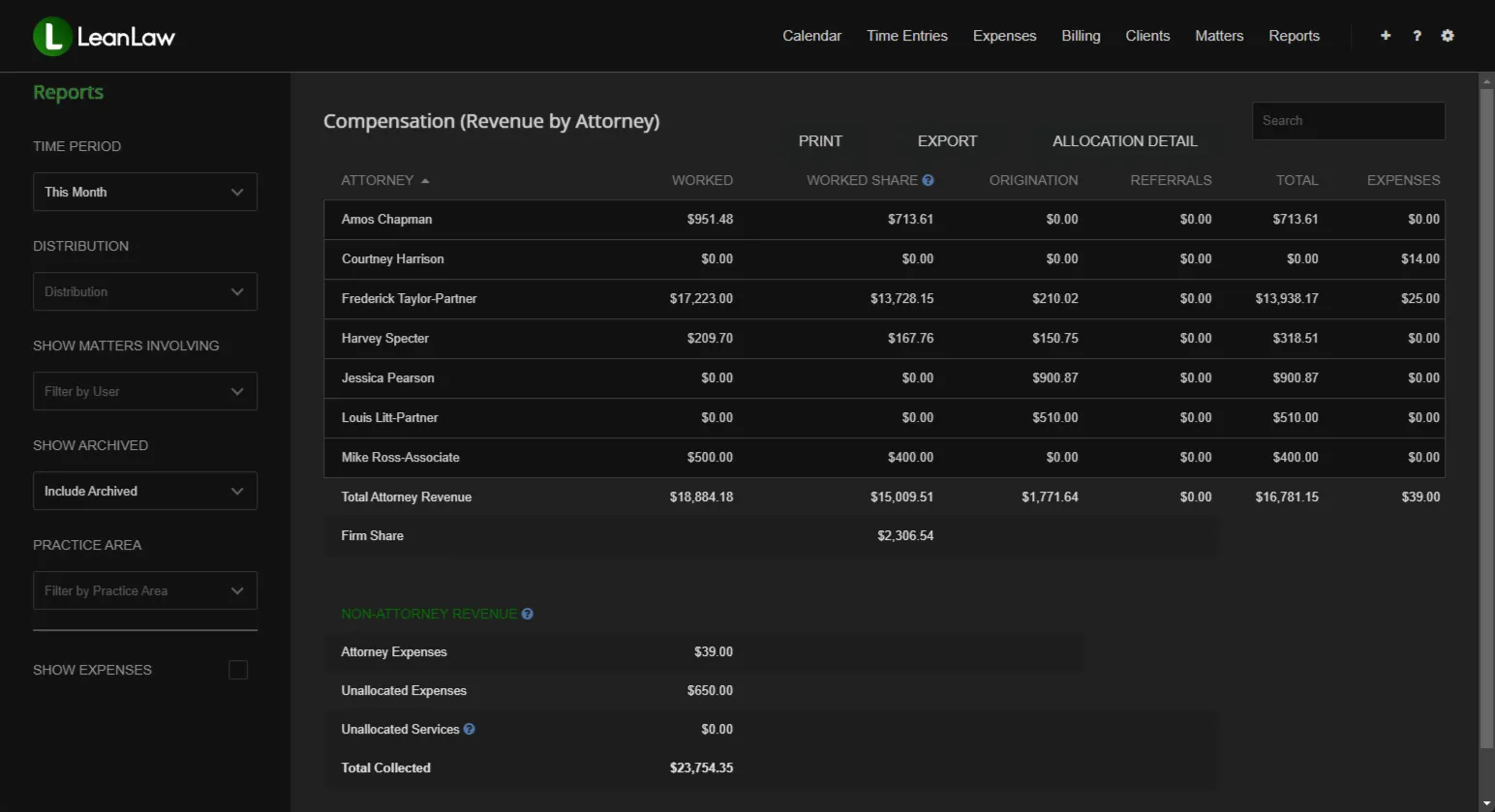
Updated in real time from QuickBooks Online
The Business Case for Automated Compensation Tracking
Manual compensation calculations cost law firms time, money, and goodwill. LeanLaw automates every step — from time entry to final partner draw.
1,000+
law firms run on LeanLaw
70%
faster invoice collections
$61K
leaked revenue recovered per attorney each year
20–50×
ROI for a typical 10-attorney firm
Firms on manual spreadsheet-based compensation tracking spend 5+ hours per month on calculations that LeanLaw automates completely.
Know Exactly Who Earned What — and Why
Law firm compensation decisions are only as good as the data behind them. LeanLaw's Reports & Compensation Tracking feature gives your firm real-time visibility into every dollar billed and collected — automatically attributed to the originator, the responsible attorney, and the working attorney on every matter.
No more month-end spreadsheet marathons. No more disputed origination credits. No more guessing at realization rates. LeanLaw integrates natively with QuickBooks Online so your compensation data is always reconciled, always current, and always defensible.
- Automatic three-way attribution: originator, responsible, working
- Real-time reports — no waiting for month-end to run the numbers
- Multi-split origination credits across multiple partners
- Realization and effective-rate reporting by attorney and matter
- Role-based access so every attorney sees their own data
"We finally know which flat fees are making us money and which ones are killing us."
Karyn Anderson
Total Sum Accounting
Originator. Responsible. Working.
Most law firms track at least two of these — and fight over the third. LeanLaw tracks all three simultaneously, automatically, on every single matter.
Originator Compensation
Credit the attorney who brought in the client. Origination reports track how much revenue each originating attorney has generated across all matters — the foundation of a fair compensation plan.
Responsible Attorney
The responsible attorney owns the client relationship. LeanLaw surfaces billed, collected, and outstanding amounts broken down by responsible attorney so leadership can evaluate relationship health and revenue accountability.
Working Attorney
Who did the actual work? Working attorney reports track time logged, hours billed, effective hourly rates, and realization by individual timekeeper — giving managing partners the data to assess productivity and reward performance.
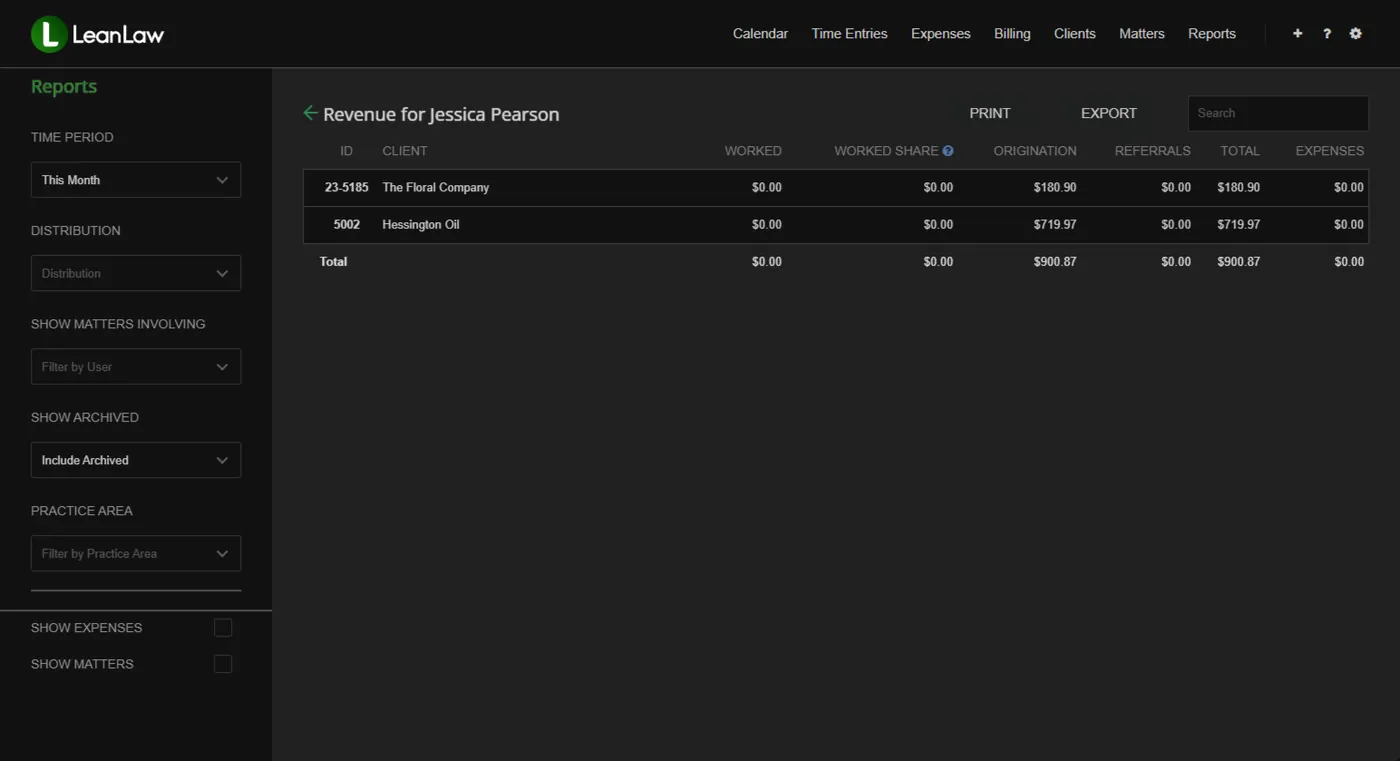
Build Compensation Plans on Facts, Not Memory
Origination credit is one of the most contested elements of any partner compensation plan. LeanLaw eliminates the debate by tracking origination automatically at the matter level — with multi-attorney splits, referral source attribution, and real-time reporting that everyone can see.
- Multi-split origination credit across multiple attorneys on a single matter
- Referral credit tracking for outside referral sources
- Real-time origination reports — no waiting for month-end runs
- Filterable by date range, practice area, client, or billing attorney
- Export to CSV for integration with compensation-plan models
Partner Draws and Equity Distributions, Automated
Managing partner compensation at the end of each month used to mean hours of spreadsheet reconciliation. LeanLaw replaces that manual process with real-time partner compensation reports that tie directly to your billing and collection data in QuickBooks Online.
- Partner draw and equity distribution reports tied to real billing data
- Compare origination vs. responsible vs. working credit in a single view
- Realization rates by partner, practice group, and matter type
- Effective hourly rate benchmarking across partners and associates
- Historical trend data for annual compensation review discussions
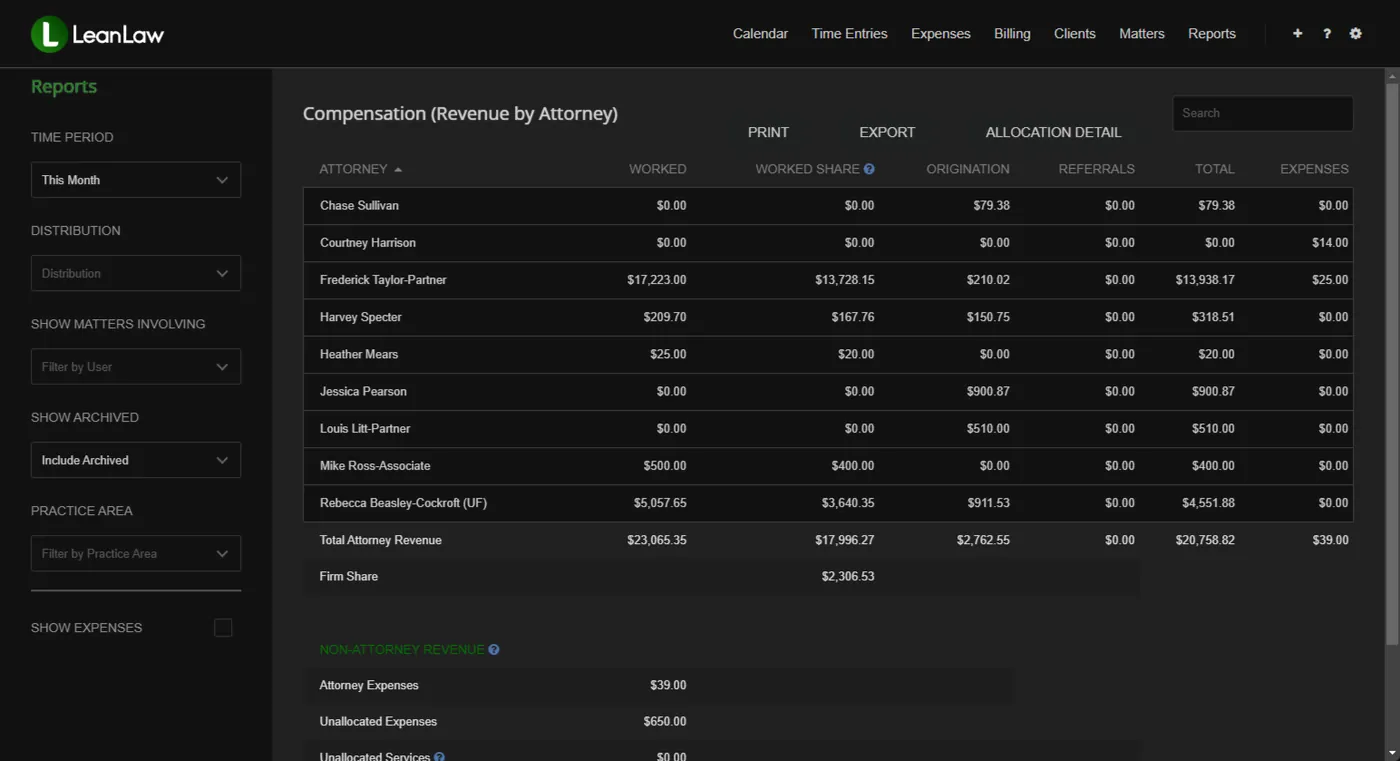
See Every Attorney's True Productivity — In Real Time
Working attorney reports show managing partners exactly where billable time is being logged, billed, written off, and collected — by attorney, by matter, and by practice area. If an attorney is underperforming on realization or lagging on time entry, you see it immediately, not at year-end.
- Hours logged vs. hours billed by timekeeper and matter
- Realization rate by attorney — where billable time is being written off
- Effective hourly rate vs. standard billing rate
- Productivity benchmarks across practice groups
- Time-entry behavior alerts: identify attorneys who lag on contemporaneous entry
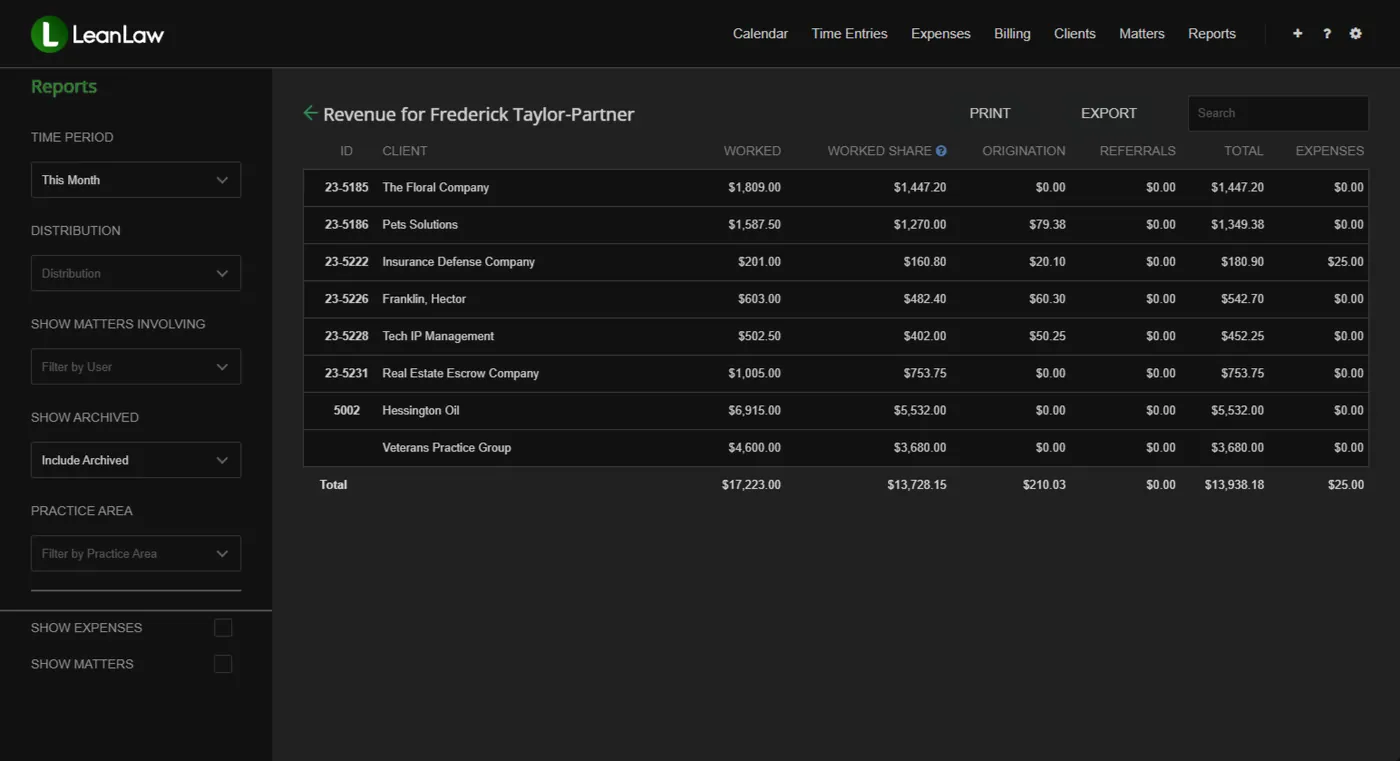
Real Results from Real Law Firms
"The revenue allocation feature alone saves us 5+ hours every month. No more spreadsheets to figure out who gets paid what on flat-fee matters."
Jennifer Wells
Beard St. Clair Gaffney Law
"Tracking payments to specific matters was a nightmare before LeanLaw. Now everything syncs to QuickBooks automatically. We see invoices paid 70% faster."
Amanda Coughlan, Billing Coordinator
Zahn Law Group
Compensation Data That Matches Your Books
LeanLaw is the only legal billing platform built natively on QuickBooks Online. That means your compensation reports pull from the same live financial data as your general ledger — no exports, no re-keying, no reconciliation gap.
When a client pays an invoice, the compensation data updates instantly. Your origination, responsible, and working attorney reports always reflect what QuickBooks shows — because they are QuickBooks data.
- Compensation reports reconcile automatically to your QBO general ledger
- No double-entry: time captured in LeanLaw flows directly to compensation reports
- QuickBooks Online Premium App Partner — #1-rated legal app in the QBO App Store
- Encryption in transit and at rest
Compensation Reports — Frequently Asked Questions
Common questions about how LeanLaw handles attorney and partner compensation tracking.
What is a compensation report in LeanLaw?
A compensation report in LeanLaw shows revenue attributed to each attorney broken down by originator, responsible attorney, and working attorney. These reports are calculated automatically from billing and collection data synced with QuickBooks Online — no manual spreadsheet work required.
What does "by originator, responsible, and working" mean?
These are three credit categories used in law firm compensation plans. Originator credit goes to the attorney who brought in the client. Responsible credit goes to the attorney who owns the client relationship. Working credit goes to the attorney (or attorneys) who performed the billable work. LeanLaw tracks all three simultaneously on every matter.
Can LeanLaw split origination credit across multiple attorneys?
Yes. LeanLaw supports multi-attorney origination splits on a single matter. You can assign percentage-based origination credit to multiple attorneys, and those splits are reflected automatically in all downstream compensation reports.
How does LeanLaw calculate compensation for flat-fee matters?
For flat-fee matters, LeanLaw tracks the fixed fee billed and collected and applies your origination, responsible, and working splits to the collected revenue. The effective hourly rate report shows whether each flat-fee engagement is profitable relative to the actual time invested.
Do I need to run compensation reports manually at month-end?
No. LeanLaw's compensation reports are generated in real time from live QuickBooks Online data. You can pull an origination report, partner productivity report, or working attorney report at any time — not just at month-end.
Who can see compensation reports in LeanLaw?
Role-based access controls determine who sees what. Firm administrators and principals can see firm-wide compensation data. Individual attorneys can be granted access to their own origination and productivity data. Managing partners can see all attorneys.
How does LeanLaw's compensation tracking integrate with QuickBooks Online?
LeanLaw is built natively on QuickBooks Online. All billing, payments, and collections sync automatically to QBO. Compensation reports pull from this live, reconciled financial data — so the numbers in your compensation reports match your books.
Still have questions? Talk to the LeanLaw team